//Product Solution
Referral Intake,
Fully Automated.
Titan Intake captures, organizes, and syncs every clinical document including referrals, lab reports, imaging, pathology, prior auths, and more. Faster for your team, better for your patients.
//Product Solution
Referral Intake,
Fully Automated.
Titan Intake captures, organizes, and syncs every clinical document including referrals, lab reports, imaging, pathology, prior auths, and more. Faster for your team, better for your patients.
//Product Solution
Referral Intake,
Fully Automated.
Titan Intake captures, organizes, and syncs every clinical document including referrals, lab reports, imaging, pathology, prior auths, and more. Faster for your team, better for your patients.

Integrated with
Integrated with








// Overview
What is Titan Intake?
Titan Intake is an AI-native referral intake and management platform for surgical specialty practices, including orthopedic, ENT, ophthalmology, GI, urology, and dermatology. It captures incoming referrals and clinical documents from fax, web forms, and uploads, classifies them and extracts the key information, groups documents by patient, and syncs a reviewed packet to your EMR, so schedulers work from an organized record instead of a pile of faxes. It is built for practice administrators, practice managers, and surgeon-owners who want referrals to reach scheduling faster without adding front-office staff.
// MultiCare
900 to 1,400+ referrals a week
Completed referrals rose from about 900 to over 1,400 per week without adding staff. MultiCare’s team measured the result, with Titan’s help, over four months.
// Security
SOC 2 Type II certified
HIPAA compliant. PHI is encrypted in transit and at rest, and your staff review every record before it reaches your EMR.
// EMR integrations
Works with your EMR
Titan Intake syncs with NextGen, eClinicalWorks, athenahealth, and Greenway, and is available in the Epic Showroom Connection Hub and the ModMed Synapsys Marketplace.
// Value
Efficiency That Drives Outcomes
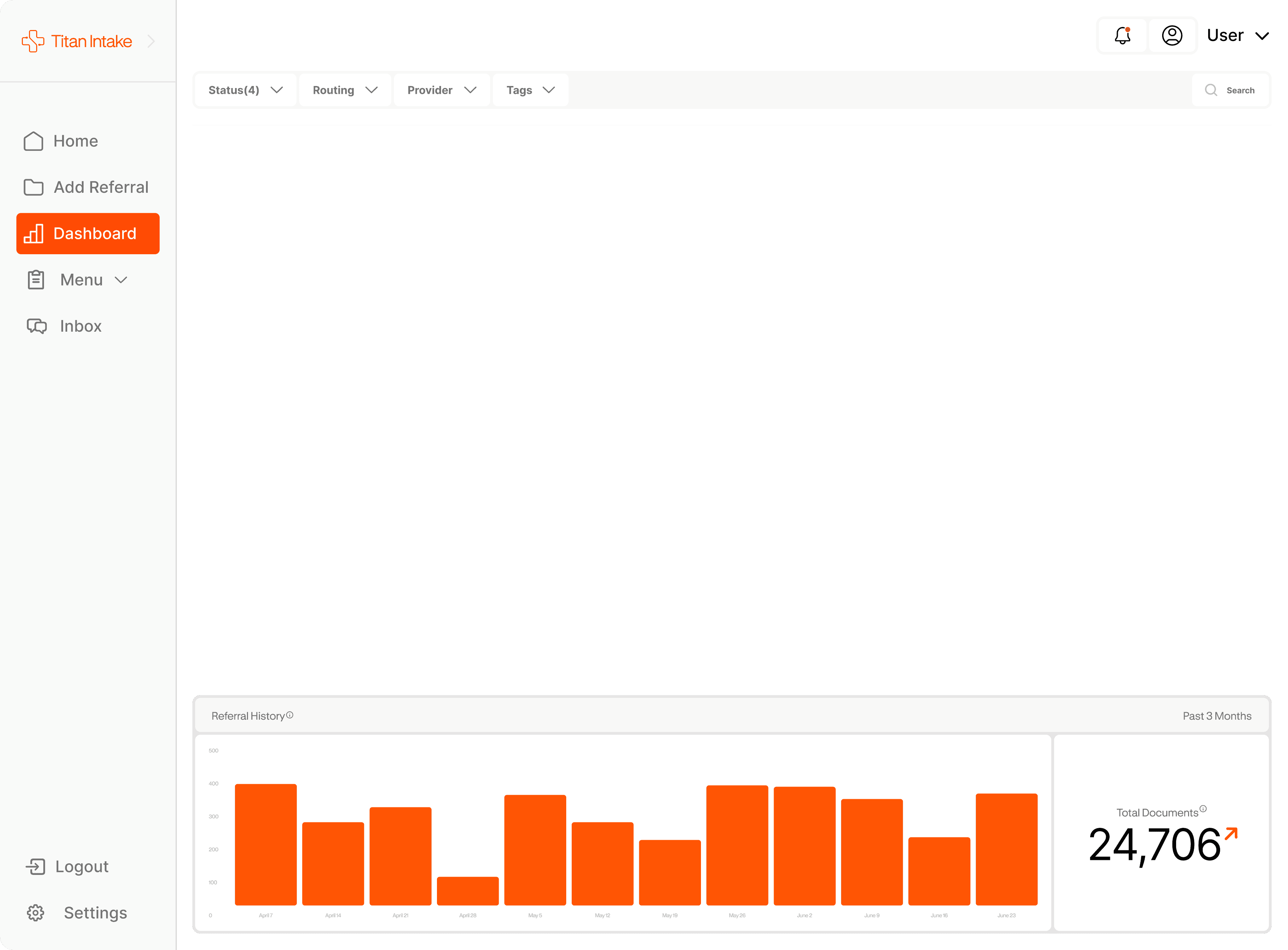
Titan Intake reduces manual effort, speeds access to care, and improves provider-patient communication, while giving leaders the data they need.
// Value
Efficiency That Drives Outcomes
Titan Intake reduces manual effort, speeds access to care, and improves provider-patient communication, while giving leaders the data they need.
// Value
Efficiency That Drives Outcomes
Titan Intake reduces manual effort, speeds access to care, and improves provider-patient communication, while giving leaders the data they need.
Save Time
Intake that once took hours is now automated and streamlined, giving staff more time for higher-value work.
Increase Revenue
The first clinic to respond wins the patient. Faster intake improves referral-to-appointment conversion and drives growth.
Improve Care
Patients get timely communication and faster access to care, while referring providers stay in the loop.

01
Capture
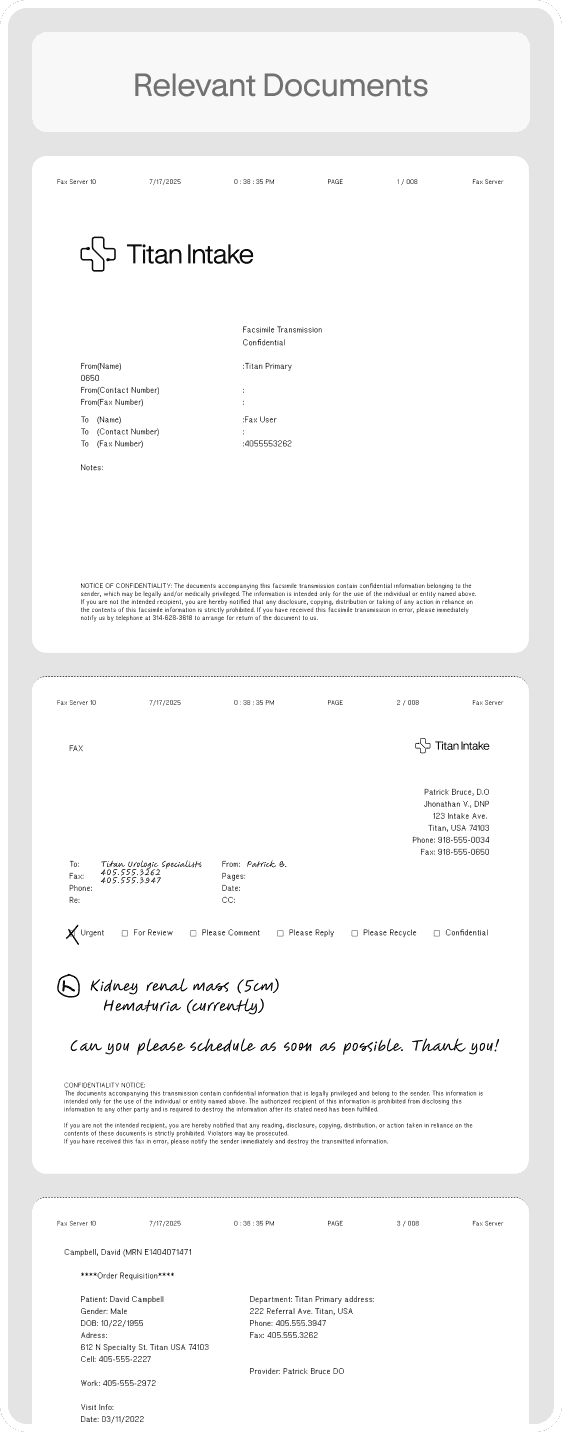
Automatically intercept incoming documents: referrals, labs, imaging, pathology, medical records.
01
Capture
Automatically intercept incoming documents: referrals, labs, imaging, pathology, medical records.
08
Update & Communicate
Status changes send automatic notifications to patients and providers.
08
Update & Communicate
Status changes send automatic notifications to patients and providers.
07
Attach & Summarize
Attach records to the correct chart location and Attach a Titan-generated Clinical Summary
07
Attach & Summarize
Attach records to the correct chart location and Attach a Titan-generated Clinical Summary
06
Review & Sync
User reviews for accuracy and Titan creates or updates the patient record.
06
Review & Sync
User reviews for accuracy and Titan creates or updates the patient record.
05
Notify
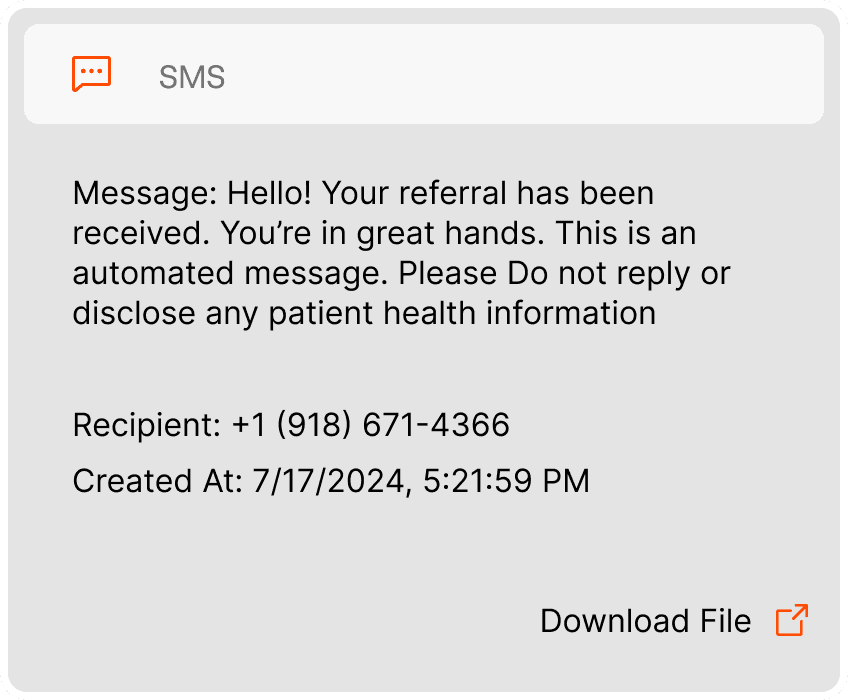
Close the loop and seamlessly request records from providers via fax and notify patient via SMS.
05
Notify
Close the loop and seamlessly request records from providers via fax and notify patient via SMS.
04
Group
Instantly match multiple records to the correct patient and create packets.
04
Group
Instantly match multiple records to the correct patient and create packets.
03
Triage
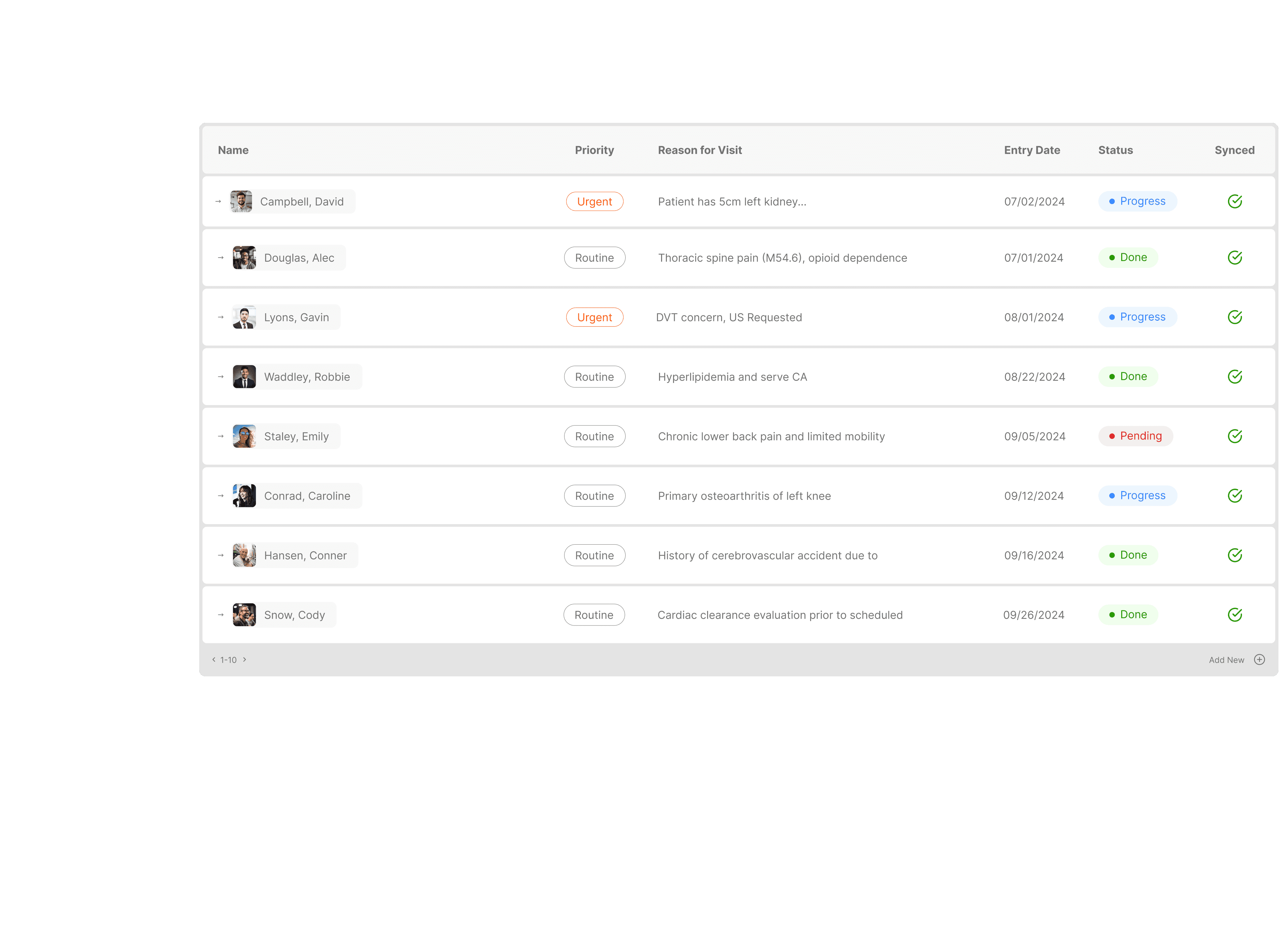
Auto Prioritize based on visit reason, medical urgency and custom, configurable rules that match what your clinic does today.
03
Triage
Auto Prioritize based on visit reason, medical urgency and custom, configurable rules that match what your clinic does today.
02
Extract
Pull key data such as demographics, insurance, reason for visit, and medical history.
02
Extract
Pull key data such as demographics, insurance, reason for visit, and medical history.
02
Extract
Pull key data such as demographics, insurance, reason for visit, and medical history.
03
Triage
Auto Prioritize based on visit reason, medical urgency and custom, configurable rules that match what your clinic does today.
04
Group
Instantly match multiple records to the correct patient and create packets.
05
Notify
Close the loop and seamlessly request records from providers via fax back and notify patient via SMS.
06
Review & Sync
User reviews for accuracy and Titan creates or updates the patient record.
07
Attach & Summarize
Attach records to the correct chart location with a Titan-generated clinical summary.
08
Update & Communicate
Status changes send automatic confirmations or rejections to patients and providers.
01
Capture
Automatically intercept incoming documents: referrals, labs, imaging, pathology, medical records.
// Tech
Built for trust at
enterprise scale
Secure, accurate, and human-centered, Titan Intake combines scientific rigor with compassionate design to support the most nuanced and mission critical workflows in healthcare.
HIPAA compliant · PHI encrypted in transit and at rest · Staff review on every record before it reaches your EMR.
Learn what patient intake automation means for your practice →

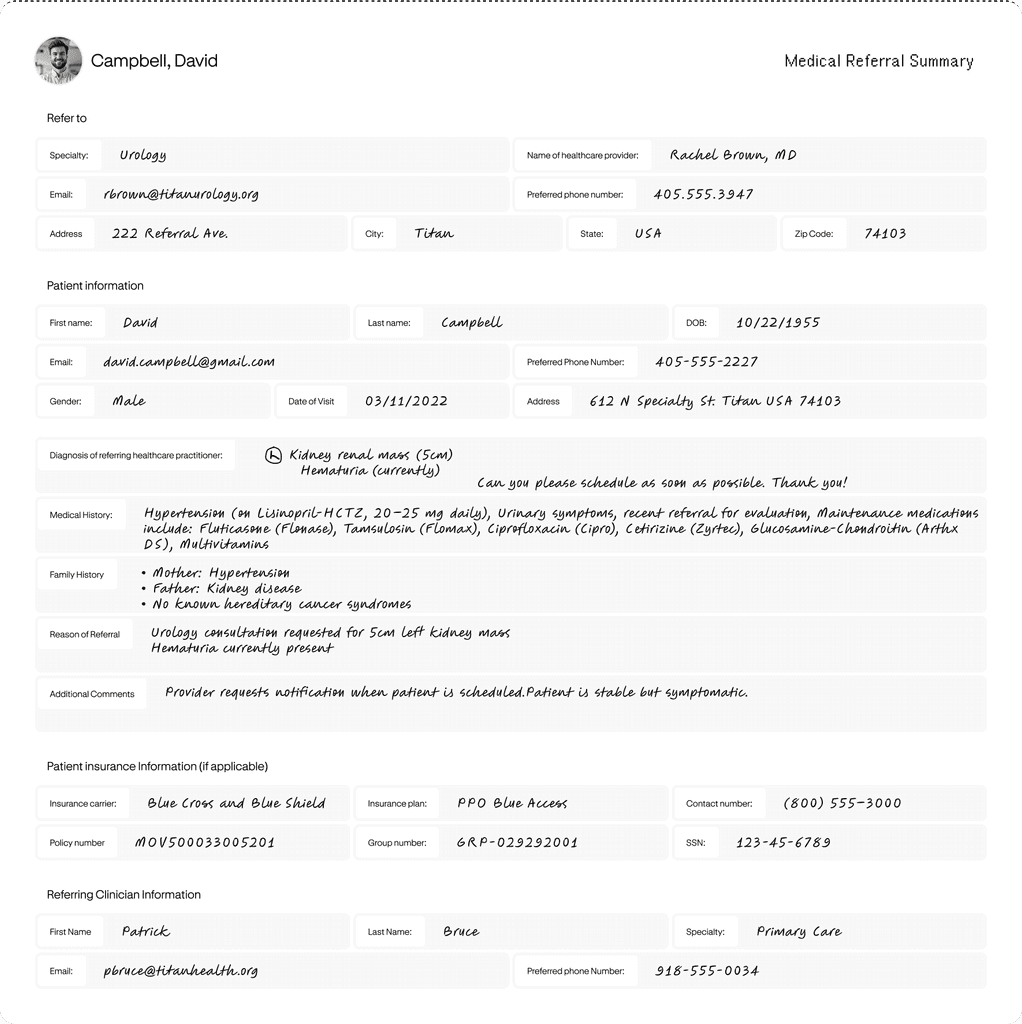
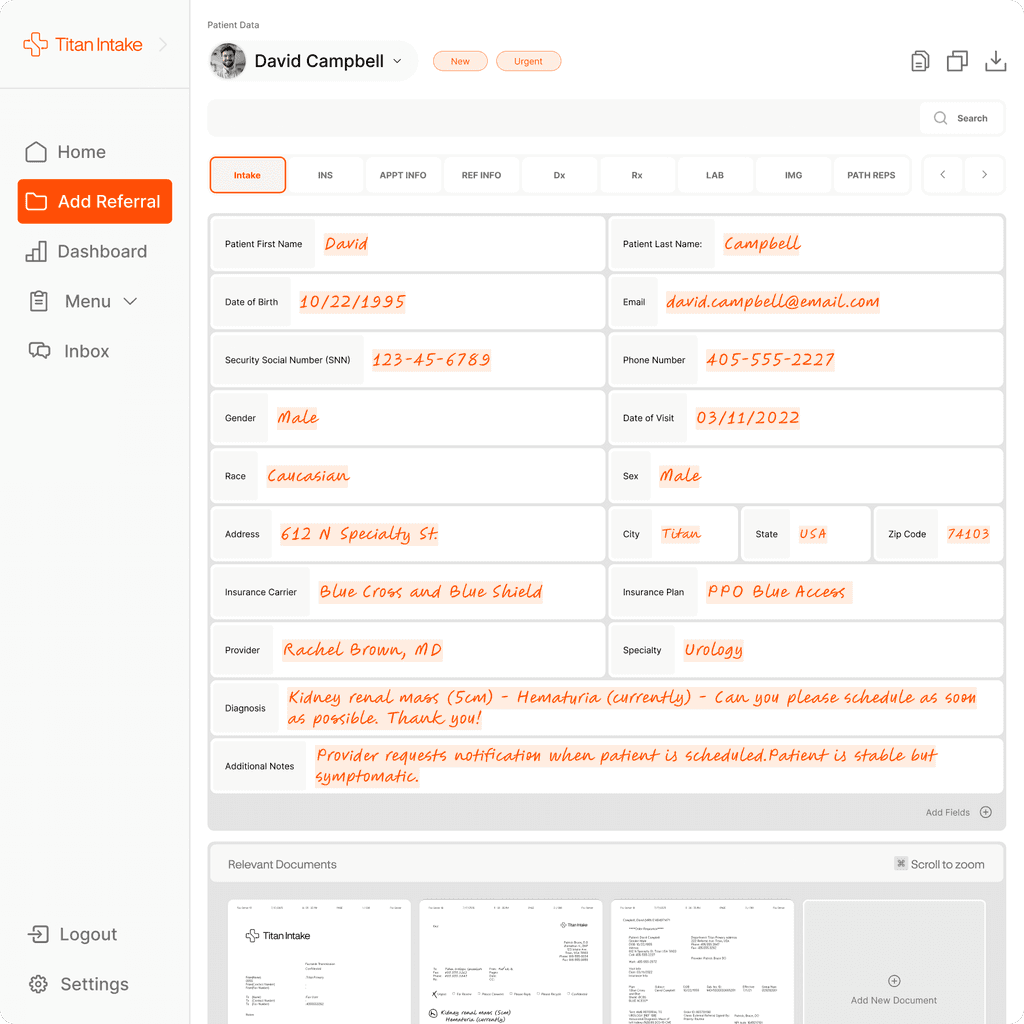
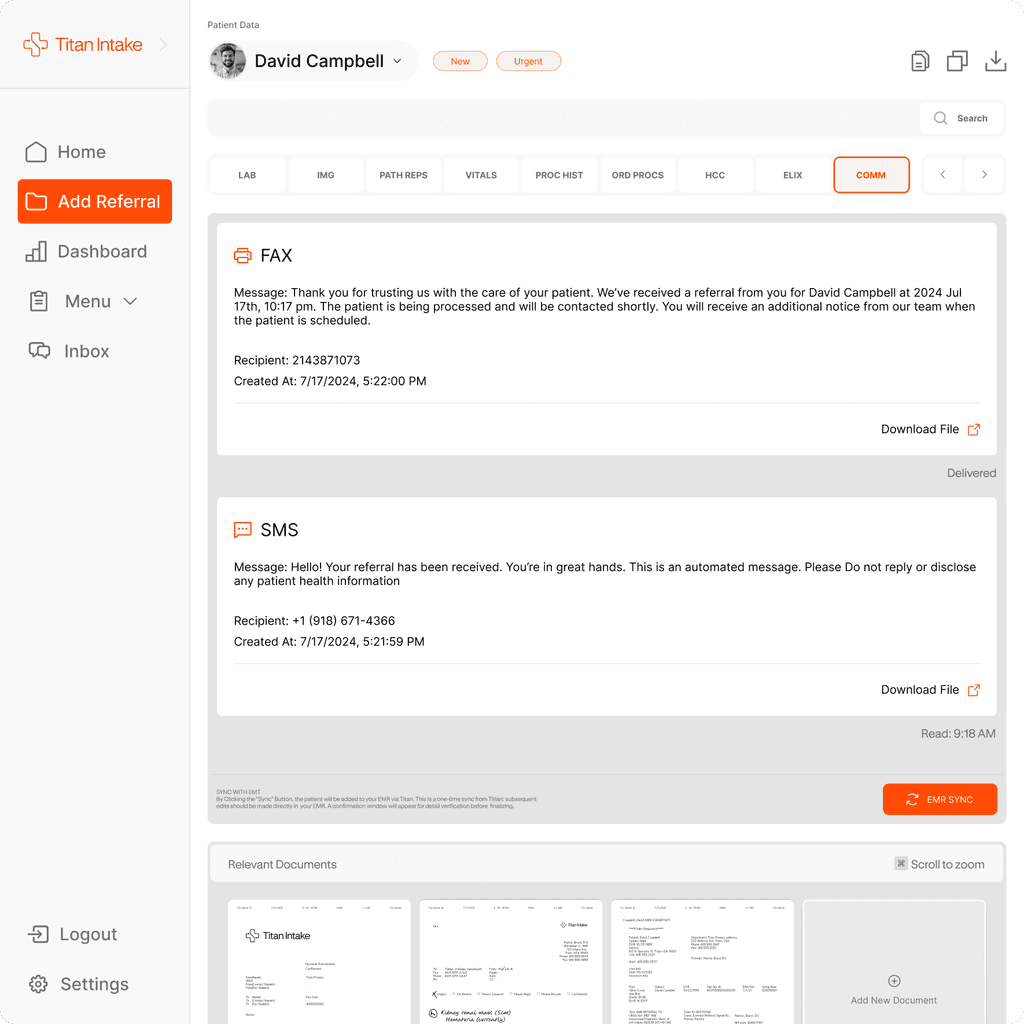
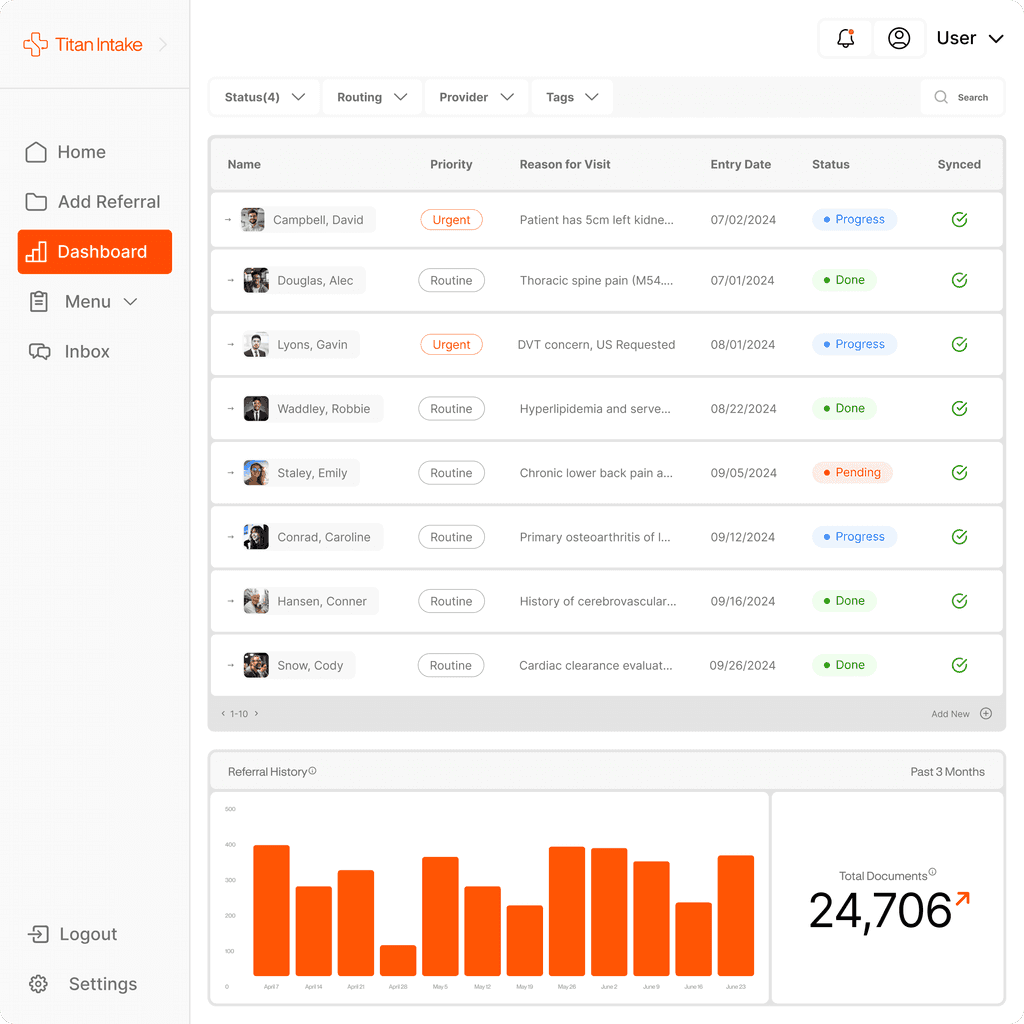
Digitization
Automation
Insights
Communication
Scalability
Digitization
Automation
Insights
Communication
Scalability
// FAQ
What You Need to Know
From how Titan Intake works to how it fits into your existing systems, here are answers to the most common questions we hear from health systems and patient access teams.
// Integration
Does Titan Intake integrate smoothly with existing EMR systems?
Yes. Titan Intake connects directly to your EMR and syncs patient data without manual re-entry. The platform matches incoming referrals and clinical documents to the correct patient record, attaches files in the right location, and generates a structured clinical summary your team can act on immediately. We support leading EMR systems used by surgical specialty practices, including orthopedic, ENT, ophthalmology, GI, urology, and plastics groups. Setup is managed by our implementation team — practices are typically live within a few weeks. If your EMR is not on our standard integration list, our team evaluates custom connections on a case-by-case basis. The goal is zero duplicate data entry: everything that comes in through Titan flows directly into the chart. Practices that complete this integration typically see referral turnaround drop below two hours, since staff are no longer re-keying data that already arrived correctly formatted in the chart.
// Document Handling
Can Titan Intake process referrals, labs, imaging, and other records?
Yes. Titan Intake captures and organizes all standard clinical document types that arrive in a specialty practice's inbox. This includes referral letters, lab reports, imaging orders and results, pathology reports, prior authorization requests, and medication requests. Documents arrive via fax, web form, or direct upload. The platform classifies each document by type, extracts the relevant clinical data, and routes it to the correct provider or scheduling queue. Multi-patient fax packets — where one transmission contains records for several different patients — are automatically separated and matched to individual charts. You do not need to sort documents before they enter the system. Titan handles the classification and routing so your staff receives an organized, reviewed packet rather than a raw pile of inbound faxes. Titan handles all of this without staff needing to pre-sort incoming faxes, which is one of the reasons practices using the platform report reducing manual intake work by up to 75%.
// accuracy
How does Titan Intake ensure reliable accuracy in workflows?
Titan Intake is validated against real-world clinical documents from surgical specialty practices, not generic test data. The platform's extraction and routing logic is continuously measured against live workflows to maintain accuracy at scale. When the system encounters a document that falls outside its confidence threshold, it flags that record for staff review rather than processing it automatically. This means errors are caught before they reach the EMR rather than discovered after the fact. Our team monitors accuracy metrics on an ongoing basis and updates models as document formats evolve. Practices also benefit from specialty-specific rules — orthopedic referrals follow different routing logic than GI cases — so the system is calibrated to the actual workflow of each practice type, not a one-size-fits-all approach. This validation approach is a key reason practices using Titan report meaningful increases in team capacity — some see capacity gains of up to 1.5x — without adding headcount to compensate for review time.
// Document Splitting
What happens when one packet contains several different documents?
Titan Intake automatically detects when a single fax or upload contains multiple document types and splits them before processing. Each document — whether a lab result, imaging report, office note, pathology report, or referral letter — is classified individually and routed to the correct location in the EMR. This is one of the most common sources of manual work in specialty practices: a 40-page fax might contain records for five different patients across three document types. Staff who handle this manually must read each page, identify what it is, and route it individually. Titan does this automatically. The result is that your team receives organized, separated documents rather than a bulk transmission they need to sort themselves. Nothing gets misfiled because the classification happens before anything reaches the chart. Automating this step is a key contributor to the time savings practices see: a lab report that takes six minutes manually is typically handled in about 30 seconds once correctly classified and routed.
// Patient Matching
How does Titan Intake manage packets that include multiple patients?
When a single fax or document packet contains records for more than one patient, Titan Intake detects the boundary between patients and groups each patient's records separately before matching them to their respective charts. This prevents cross-patient filing errors — one of the most serious data integrity risks in a high-volume referral environment. The system uses a combination of demographic data, document structure, and clinical context to determine where one patient's records end and another's begin. After separation, each patient's packet is matched to the correct existing record in the EMR or flagged as a new patient. Staff review the AI-assembled packets for accuracy before anything is finalized in the chart, providing a human checkpoint on every record that moves through the system. Because this separation happens automatically, referrals that would take roughly fifteen minutes of manual sorting per patient are processed in about a minute, with the human review step catching anything the system flags as uncertain.
// Scheduling Rules
Can Titan Intake apply specialty rules and request missing records?
Yes. Titan Intake supports specialty-specific routing and completeness rules configured for your practice. When a referral arrives, the system checks whether all required clinical documents are present based on the specialty and procedure type. For example, an orthopedic referral for a joint replacement might require imaging reports and prior authorization before it can be triaged to a surgeon. If those documents are missing, Titan automatically contacts the referring provider to request them — via fax or notification — without staff intervention. This closes the loop on incomplete referrals that would otherwise sit in a queue waiting for someone to notice and follow up. Practices using this feature report significantly shorter time-to-schedule for new patients because records arrive complete and ready for clinical review. This works across every specialty the platform supports — orthopedic, ENT, ophthalmology, GI, urology, and plastic and reconstructive surgery — each with its own configured completeness checklist rather than one generic set of rules.
// FAQ
What You Need to Know
From how Titan Intake works to how it fits into your existing systems, here are answers to the most common questions we hear from health systems and patient access teams.
// Integration
Does Titan Intake integrate smoothly with existing EMR systems?
Yes. Titan Intake connects directly to your EMR and syncs patient data without manual re-entry. The platform matches incoming referrals and clinical documents to the correct patient record, attaches files in the right location, and generates a structured clinical summary your team can act on immediately. We support leading EMR systems used by surgical specialty practices, including orthopedic, ENT, ophthalmology, GI, urology, and plastics groups. Setup is managed by our implementation team — practices are typically live within a few weeks. If your EMR is not on our standard integration list, our team evaluates custom connections on a case-by-case basis. The goal is zero duplicate data entry: everything that comes in through Titan flows directly into the chart. Practices that complete this integration typically see referral turnaround drop below two hours, since staff are no longer re-keying data that already arrived correctly formatted in the chart.
// Document Handling
Can Titan Intake process referrals, labs, imaging, and other records?
Yes. Titan Intake captures and organizes all standard clinical document types that arrive in a specialty practice's inbox. This includes referral letters, lab reports, imaging orders and results, pathology reports, prior authorization requests, and medication requests. Documents arrive via fax, web form, or direct upload. The platform classifies each document by type, extracts the relevant clinical data, and routes it to the correct provider or scheduling queue. Multi-patient fax packets — where one transmission contains records for several different patients — are automatically separated and matched to individual charts. You do not need to sort documents before they enter the system. Titan handles the classification and routing so your staff receives an organized, reviewed packet rather than a raw pile of inbound faxes. Titan handles all of this without staff needing to pre-sort incoming faxes, which is one of the reasons practices using the platform report reducing manual intake work by up to 75%.
// accuracy
How does Titan Intake ensure reliable accuracy in workflows?
Titan Intake is validated against real-world clinical documents from surgical specialty practices, not generic test data. The platform's extraction and routing logic is continuously measured against live workflows to maintain accuracy at scale. When the system encounters a document that falls outside its confidence threshold, it flags that record for staff review rather than processing it automatically. This means errors are caught before they reach the EMR rather than discovered after the fact. Our team monitors accuracy metrics on an ongoing basis and updates models as document formats evolve. Practices also benefit from specialty-specific rules — orthopedic referrals follow different routing logic than GI cases — so the system is calibrated to the actual workflow of each practice type, not a one-size-fits-all approach. This validation approach is a key reason practices using Titan report meaningful increases in team capacity — some see capacity gains of up to 1.5x — without adding headcount to compensate for review time.
// Document Splitting
What happens when one packet contains several different documents?
Titan Intake automatically detects when a single fax or upload contains multiple document types and splits them before processing. Each document — whether a lab result, imaging report, office note, pathology report, or referral letter — is classified individually and routed to the correct location in the EMR. This is one of the most common sources of manual work in specialty practices: a 40-page fax might contain records for five different patients across three document types. Staff who handle this manually must read each page, identify what it is, and route it individually. Titan does this automatically. The result is that your team receives organized, separated documents rather than a bulk transmission they need to sort themselves. Nothing gets misfiled because the classification happens before anything reaches the chart. Automating this step is a key contributor to the time savings practices see: a lab report that takes six minutes manually is typically handled in about 30 seconds once correctly classified and routed.
// Patient Matching
How does Titan Intake manage packets that include multiple patients?
When a single fax or document packet contains records for more than one patient, Titan Intake detects the boundary between patients and groups each patient's records separately before matching them to their respective charts. This prevents cross-patient filing errors — one of the most serious data integrity risks in a high-volume referral environment. The system uses a combination of demographic data, document structure, and clinical context to determine where one patient's records end and another's begin. After separation, each patient's packet is matched to the correct existing record in the EMR or flagged as a new patient. Staff review the AI-assembled packets for accuracy before anything is finalized in the chart, providing a human checkpoint on every record that moves through the system. Because this separation happens automatically, referrals that would take roughly fifteen minutes of manual sorting per patient are processed in about a minute, with the human review step catching anything the system flags as uncertain.
// Scheduling Rules
Can Titan Intake apply specialty rules and request missing records?
Yes. Titan Intake supports specialty-specific routing and completeness rules configured for your practice. When a referral arrives, the system checks whether all required clinical documents are present based on the specialty and procedure type. For example, an orthopedic referral for a joint replacement might require imaging reports and prior authorization before it can be triaged to a surgeon. If those documents are missing, Titan automatically contacts the referring provider to request them — via fax or notification — without staff intervention. This closes the loop on incomplete referrals that would otherwise sit in a queue waiting for someone to notice and follow up. Practices using this feature report significantly shorter time-to-schedule for new patients because records arrive complete and ready for clinical review. This works across every specialty the platform supports — orthopedic, ENT, ophthalmology, GI, urology, and plastic and reconstructive surgery — each with its own configured completeness checklist rather than one generic set of rules.
Take back power over referrals.
Save time, increase revenue, and accelerate patient care.
Take back power over referrals.
Save time, increase revenue, and accelerate patient care.
Take back power over referrals.
Save time, increase revenue, and accelerate patient care.
Take back power over referrals.
Save time, increase revenue, and accelerate patient care.
Subscribe to our newsletter
500 W 2nd St., Suite 1900, Austin, TX 78701
+SOC 2 Type 2 Certified
Copyright 2026© Titan Intake. All Rights Reserved
Subscribe to our newsletter
500 W 2nd St., Suite 1900, Austin, TX 78701
+SOC 2 Type 2 Certified
Copyright 2026© Titan Intake. All Rights Reserved
Subscribe to our newsletter
500 W 2nd St., Suite 1900, Austin, TX 78701
+SOC 2 Type 2 Certified
Copyright 2026© Titan Intake. All Rights Reserved
Subscribe to our newsletter
500 W 2nd St., Suite 1900, Austin, TX 78701
+SOC 2 Type 2 Certified
Copyright 2026© Titan Intake. All Rights Reserved